


Metro Transit
3.1544.00 Reviews
App Specs
- Version
- 4.11.0
- Updated On
- License
- Free
- Downloads
- 100,000+
- Developer
- Metropolitan Council - Old
- Categories
- Travel & Local
- Platform
- Android
Screenshots
 Analysis by AppCompare
When I need to use public transport without stopping at a ticket machine, Metro Transit is the kind of app I would try first. It is a free travel and local app from Metropolitan Council - Old, built around mobile ticketing for Metro Transit rather than around being a complete travel planner. That distinction matters: it can be useful when the main problem is buying and presenting a fare, but it should not automatically replace a dedicated map, journey planner, or the transit operator’s wider information channels.
I approached it as I would on an ordinary travel day: start with no ticket, work out what I need, complete the purchase, and then make sure the result is ready when boarding time arrives. That workflow is where the app makes the most sense. Its store summary describes it as the official mobile ticketing app from Metro Transit, and my overall impression matches that focused purpose. It is less about exploring a city and more about turning a phone into the place where a Metro Transit fare is handled.
From an empty phone screen to a usable transit ticket
I find the move from an empty screen to a ready ticket works best when I give it a little breathing room: opening the app before I reach the stop lets me focus on the fare choice rather than the queue. I would also check that the ticket is visible after purchase, not just that the payment step has finished. With that basic routine in mind, the next question is what to expect from the app’s pace when travel gets busy.
Starting with the right expectation
The first useful decision is deciding whether I need ticketing or trip planning. If I already know which Metro Transit service I am taking and simply want to avoid handling a paper ticket, this app has a clear role. If I am still comparing routes, checking several operators, or trying to understand an unfamiliar area, I would normally pair it with a maps app or another transit information tool. Metro Transit is strongest once the travel question has narrowed to “How do I get my fare ready?”
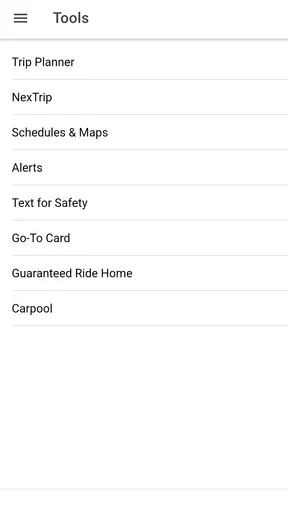
That focused design can feel refreshing. Many transport apps try to combine route maps, service notices, arrival predictions, account functions, payments, and ticketing in one crowded interface. A ticketing-first app can reduce the number of decisions on screen. At the same time, the narrower scope means I should not open it expecting it to solve every part of a journey from my front door to the final stop.
The app is free, has an Everyone content rating, and supports Android devices running version 6.0 or later. Its current version is 4.11.0, which is useful to know before installing it on an older phone. The application has been available since November 3, 2016, so it is not a brand-new experiment. That history also explains why I would treat it as a practical utility rather than a flashy travel companion.
Choosing the ticket without rushing
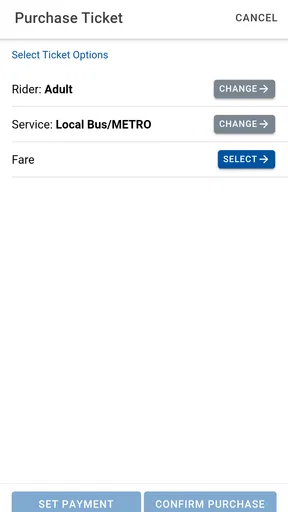
My first habit would be to open the app before I am standing in a boarding queue. This is more than a convenience tip. Mobile ticketing creates a handoff between the purchase step and the moment when the ticket must be shown, and rushing through that handoff is where avoidable problems begin. I want time to read the fare choices, confirm the selection, and make sure the app has completed the transaction before the vehicle arrives.
Worth Reading Before You Choose

EA SPORTS FC Mobile 26 Is a Bigger Football Game, but It Takes Time

Flipboard Shows What News Apps Must Do Beyond the Feed

Switching to Android Auto Means Rethinking Your Driving Routine

Google Calendar Makes a Crowded Week Easier to Manage

Ludo King Makes the Most of the Minutes Between Plans

Baby Panda World Brings Quick Play to Modern Phones, but Its Game Library Feels Busy
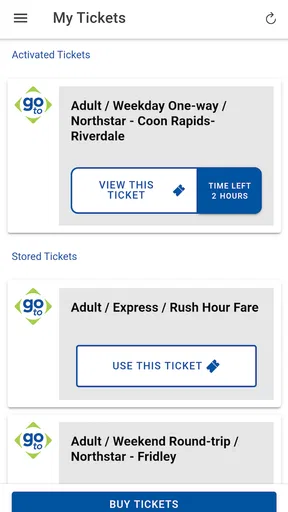
I would also check the ticket details immediately after buying. A mobile ticket is only useful if I can identify what I purchased and present it when needed. Rather than assuming that a payment screen means the process is finished, I would look for the resulting ticket area and keep the phone accessible. This is one of the less obvious advantages of treating the app as part of the travel preparation routine instead of opening it for the first time at the exact moment of boarding.
For a regular commuter, that routine can become simple: decide on the day’s travel, open Metro Transit, select the appropriate fare, and verify the ticket before leaving. For an occasional rider, the important point is not to confuse familiarity with certainty. Even if the interface looks straightforward, fare choices can still require attention, especially when the journey is different from the usual one.
A realistic everyday journey
Imagine that I am leaving work and need to board Metro Transit shortly. I have my phone, but no paper ticket, and I do not want to add a stop at a machine. I open the app while I still have a moment, choose the relevant ticket option, and complete the purchase. Once the ticket is available, I keep the screen ready rather than locking the phone and putting it deep in my bag.
The outcome is not a dramatic transformation of the journey; it is a small reduction in friction. I have moved the ticket step earlier, so boarding is less dependent on finding a machine or managing paper. That is exactly the kind of modest improvement a good transport utility should provide. The app earns its place when it saves a few practical steps without making me learn an unnecessarily complicated system.
There is also a useful backup mindset here. I would not wait until the vehicle is already at the stop to discover that I need to install the app, sign in, or finish a payment. A better workflow is to install it at home, open it once, and understand where the ticket appears. That preparation is especially worthwhile for occasional users, visitors, or anyone whose phone battery is already low.
The handoff from purchase to boarding
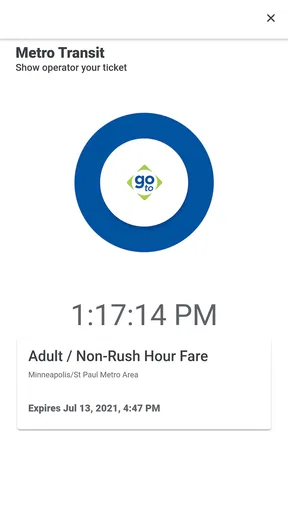
The most important handoff is between the person buying the fare and the operator or inspector who needs to see it. The app sits in the middle of that exchange. I complete the purchase on one side, then present the resulting mobile ticket on the other. A successful payment alone is not the final outcome; the useful result is a ticket that I can access quickly and show clearly.
This is why screen brightness, battery level, and phone access matter even though they are not glamorous app features. I would keep the device charged before a long day, avoid burying the app behind several other screens, and make sure I know how to return to the active ticket. These habits reduce the chance that a perfectly valid purchase becomes awkward at the point of inspection.
For a family or group, I would slow down and confirm how the selected fare is meant to cover the people travelling together before paying. Mobile ticketing can be convenient, but it concentrates responsibility in one phone. If that phone is misplaced, out of battery, or unavailable, the handoff becomes harder for everyone relying on it. In that situation, carrying a backup plan is sensible, particularly when the trip is important.
What the app does well in this workflow
Metro Transit’s main strength is its directness. I do not need a general-purpose travel app to understand why I am opening it: I am there to handle a Metro Transit ticket. That clarity is valuable for users who already know the route and want a digital alternative to buying in person. The app also avoids the need to carry a separate paper ticket for the part of the journey managed through the phone.
Its official connection to Metro Transit is another practical benefit. When I use an operator-specific ticketing tool, the fare process is tied to the service I intend to ride rather than being buried inside a broad third-party platform. That can make the workflow easier to understand, especially for a visitor who has already identified the correct transit network and does not want to compare unrelated services.
The app’s adoption suggests that this use case is meaningful to a substantial number of riders: it has more than one hundred thousand installs. Its average rating is 3.1 from roughly one thousand one hundred ratings, with 544 written reviews. I read that combination as a reminder to keep expectations practical. People clearly use it, but the experience is not universally smooth enough to treat it as flawless.
Where it compares well with the usual alternatives
Compared with buying a paper ticket from a machine, the phone-based route can be more convenient when I already have the app installed and my device is ready. I can prepare before reaching the stop, avoid searching for the correct machine, and keep the ticket with the device I already carry. The trade-off is that the phone becomes part of the fare system, so battery, connectivity, and access to the app matter more than they would with paper.
Compared with a general maps app, Metro Transit is more specialized. A maps application may be better for discovering routes, estimating walking time, or combining several transport modes. Metro Transit is the better fit when the route decision is already made and the immediate task is obtaining the operator’s mobile fare. I would happily use both: one for planning the journey and this one for the ticketing handoff.
Compared with a third-party transit platform, the official app may feel more focused because it is not trying to serve every transport provider at once. That focus is also its limitation. If my day includes multiple networks, I would prefer a tool that brings the whole itinerary together, then use Metro Transit specifically for the portion where its ticketing is relevant. Choosing between them depends on whether I value network-wide planning or operator-specific fare handling at that moment.
Small habits that make the experience safer
The first habit I recommend is buying before the critical moment. A few minutes of preparation gives me time to correct a mistaken selection or deal with a slow connection without holding up boarding. I would also open the ticket after purchase instead of assuming it will be obvious later. That simple check turns an uncertain transaction into a completed travel step.
The second is separating route research from ticket purchase. I would use a map or transit planner to decide where and when to go, then open Metro Transit when I am ready to handle the fare. This prevents me from expecting the ticketing app to answer planning questions it was not designed to answer and keeps the screen focused on the task that matters.
The third is planning around phone failure. I would avoid starting a trip with a nearly empty battery, keep the device accessible, and remember that a digital ticket is not as independent as a paper one. This is particularly important for visitors who may also need their phone for directions, translation, boarding information, and communication. The more jobs the phone has, the more valuable a charging plan becomes.
A fourth useful trade-off concerns frequency of use. For a daily rider, the convenience of repeating a familiar mobile-ticket workflow can outweigh the setup effort. For someone who rides only once, installing a dedicated app may feel like extra preparation compared with using an available physical purchase option. I would choose Metro Transit when avoiding that extra stop matters, not simply because digital is always better.
Where the flow breaks down
The biggest weakness is the dependency chain. The journey can break at installation, ticket selection, payment, loading the ticket, or presentation. A paper ticket has its own inconveniences, but it does not depend on a charged phone and an accessible screen. With Metro Transit, the convenience is real only when every link in the phone-based process is available at the right time.
The app can also feel limited if I want a complete travel experience in one place. Someone arriving in an unfamiliar area may need route discovery, stop information, walking directions, and broader service context before ticketing becomes relevant. In that case, I would not skip a full planning tool. Metro Transit is a component of the journey, not necessarily the entire journey.
The modest average rating is another reason I would leave room for friction. I would not interpret it as proof that the app will fail for me, but I would avoid relying on it for a time-critical first attempt. Installing it early, learning the purchase path, and checking the ticket before travel are sensible responses to that uncertainty. The app is easier to trust after I have personally confirmed that it fits my phone and routine.
Occasional riders should also think about the handoff between people. If one person buys tickets for a group, that phone may need to remain available throughout the relevant inspection or boarding process. If each traveller needs an independent ticket, the group should decide that before reaching the stop. The app can simplify payment for one organiser while making phone access a shared dependency.
Who should use it and who should look elsewhere
I would recommend Metro Transit to riders who already know they are using Metro Transit and want a free, operator-focused way to manage a mobile fare. It is especially suitable for commuters, visitors who have planned their route in advance, and anyone who prefers preparing a ticket before arriving at the stop. The Everyone rating also makes it broadly approachable for ordinary household use.
I would be more cautious about recommending it as the only travel app for a complex day. If I need multi-operator planning, detailed navigation, or a single place to coordinate every leg, a general transit or maps application is likely the better starting point. Likewise, if my phone is unreliable, regularly runs out of power, or cannot comfortably handle an on-the-spot purchase, a physical ticket option may be less stressful.
The app is free to download, but “free” should not be confused with “frictionless.” The fare itself is part of the travel transaction, and the phone still needs to be ready at the moment the ticket is used. I would judge the app by whether it makes that transaction easier for my specific journey, not by the absence of an upfront app price.
My final take after following the complete journey
Metro Transit succeeds when I treat it as a focused tool with one clear job: move the Metro Transit ticket process onto my phone. From starting without a ticket, through selecting and completing the purchase, to presenting the result while boarding, the workflow is understandable and potentially convenient. Its best quality is not a long list of extras; it is the reduced distance between deciding to ride and having the fare ready.
My recommendation comes with a condition: prepare before the pressure point. Install it ahead of time, understand the ticket screen, keep the phone charged, and use another tool for route planning when necessary. Those steps address the main weaknesses without asking the app to become something it is not.
For the right rider, the strongest reason to choose Metro Transit is dependable preparation rather than last-second improvisation. I would keep it available if I used the network regularly or wanted a convenient official ticketing option. I would skip relying on it alone for a complicated, multi-network itinerary. In that narrower but important role, it is a useful travel companion, with enough practical value to earn a place on the phone while still requiring sensible backup habits.
Pros
- Real-time arrival updates help reduce waiting at stops.
- Trip planning covers buses
- trains
- and connecting routes.
- Service alerts highlight delays
- closures
- and route changes.
- Fare and pass information is easy to find in the app.
- Saved routes make checking frequent journeys faster.
Cons
- Real-time data may be unavailable for some routes or stops.
- Coverage depends on the transit agency and supported service area.
- The interface can feel crowded when viewing complex trips.
- Some features may require location access to work properly.
- Arrival predictions can change quickly during disruptions.
FAQs for Metro Transit
What is Metro Transit, and what can I use it for?
Metro Transit is a public transportation app designed to help riders plan trips, check routes, and follow service information for participating transit systems. Depending on your location, it may provide bus and rail schedules, real-time departures, stop information, maps, alerts, and fare details. Because available features vary by agency, confirm that your local Metro Transit system is supported before relying on the app for daily travel.
Does Metro Transit provide real-time bus and train information?
Metro Transit can provide real-time departure predictions and service updates for supported routes, but accuracy depends on the transit agency’s data and the vehicle’s connection to its tracking system. Some departures may be listed as scheduled rather than live, especially during technical problems or in areas with limited coverage. It is wise to check alerts and allow extra time when traveling during disruptions or busy periods.
Can I use Metro Transit to plan a complete journey?
Yes, the app is generally useful for planning journeys by entering a starting point, destination, travel time, or nearby stop. It may suggest combinations of buses, trains, walking sections, and transfers, depending on the local network. Before starting your trip, review transfer times, stop names, accessibility information, and service alerts carefully, since construction, detours, or late vehicles can change the best route.
Does Metro Transit support mobile tickets or fare payments?
Fare and ticketing options depend on the specific Metro Transit agency and the region where you use the app. In some locations, the application may display fare information, connect with a separate ticketing service, or support mobile passes; in others, it may only provide schedules and trip planning. Check the app’s local features and current fare rules before assuming that a digital ticket can be purchased or shown onboard.
Does Metro Transit require an internet connection or location access?
An internet connection is normally needed to load current schedules, real-time departures, alerts, maps, and route-planning results. Location permission can make it easier to find nearby stops and identify your position, although you may still search manually if you prefer not to share your location. Downloaded or previously loaded information may be limited, so do not depend on offline access for live service updates.


